
Our Projects
Rash Cam

Rash Cam
Rash Cam is mainly a smart dash-cam equipped with state-of-the-art yet cheap and easily available sensors. This device can detect bad driving behaviors like speeding, aggressive driving & hard cornering, and notify the vehicle owner regarding these events along with video clips from the dashboard of the vehicle.
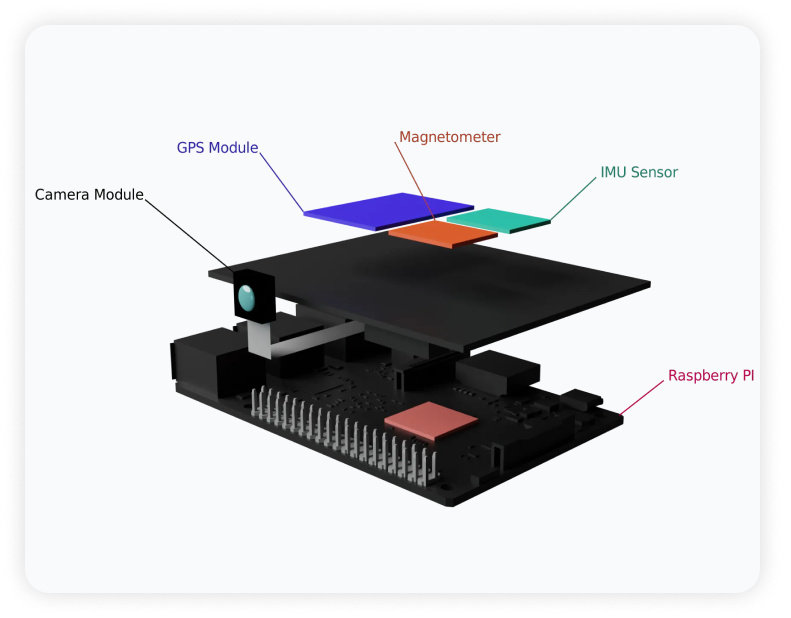
Rash Cam Components
Overview RashCam is a smart dash-cam equipped with state-of-the-art yet cheap and easily available sensors. This device can detect bad driving behaviors like speeding, aggressive driving & hard cornering, and notify the vehicle owner regarding these events along with video clips from the dashboard of the vehicle.
1. RashCam Device (IoT Hardware)
- Raspberry PI 4
- Raspberry PI Cameras
- IMU Sensor (9DOF)
- GPS Sensor
2. Device Software
- Python
- Linux
- GStreamer
- WebRTC
- Mender (OTA Updates)
3. Web Application
- Client App (Next.js)
- Backend Server (Django)
- Signaling Server
- TURN Server (coturn)
- PostgreSQL Database
- Redis Cache/Queue
- Celery Workers
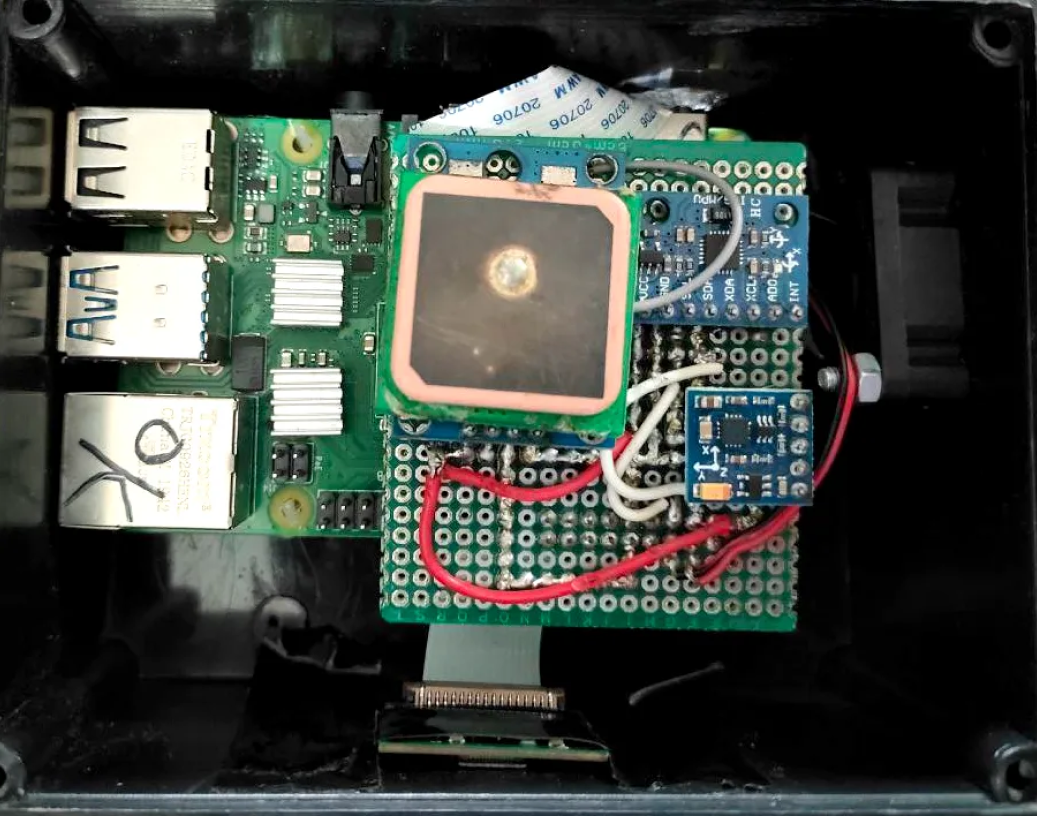
Device Hardware
- Raspberry PI 4 is the main brain of the device. It is a single board computer with 4GB of RAM and 64bit ARM processor. It runs Raspberry PI OS which is a Debian based Linux distribution.
- Raspberry PI Camera is used to capture video from the dashboard of the vehicle. It is connected to Raspberry PI via CSI interface.
- IMU Sensor - MPU 9250 is used to detect the orientation, acceleration (both linear and angular) and magnetic field of the device. It is connected to Raspberry PI via I2C interface.
- GPS Sensor - NEO 6M is used to detect the location of the device. It is connected to Raspberry PI via UART interface.
Device Software
The software stack of the device is divided into two parts:
Firmware:
- OS: We used Raspberry PI OS as our base operating system. It is a Debian based Linux distribution. We tried to use Fedora IoT, but it was not stable enough for our use case.
- Video Streaming: We used GStreamer to stream video from the camera. GStreamer is a pipeline based multimedia framework. It is used to create complex multimedia pipelines for video streaming, video recording, video encoding, video decoding, video transcoding, etc.
- OTA Updates: We used Mender to manage OTA updates for our device. Mender is an open source OTA update manager for embedded Linux devices, which helped us to update our device software remotely.
Application:
We picked Python as the main language for our app because it's easy to use and flexible. This was super helpful, especially when dealing with a tricky and unclear problem. It let us quickly try out and change our ideas as we worked on the project. GStreamer Python Bindings helped us in creating GStreamer pipelines in Python.
The nature of the application leads us to implement a complete event driven architecture to handle all the events from different sensors and video streams and process them accordingly.
The above diagram shows the flow of events from different sources to different sinks. Before we dive into the details of each component, let's first define some terms:
Definitions:
- Sourceis an event producer.
- Sinkis where those events get dumped after some processing.
- Binis a special element that can be a source and a sink at the same time.
- Operators - Filtersare the intermediate operations happening on the events. They can skip, combine, or map events.
Architecture:
- GPS Source produces GPS events once the satellite connection is established. These events contain the GPS coordinates.
- A Distinct Filter is applied on these events which only lets pass events with at least a certain amount of change. For example, if the vehicle is parked it won't throw multiple events with the same coordinates.
- Next, a Throttling Filter is applied which throttles the number of events per second.
- Finally, the events are pushed to Websocket Sink, which is connected to the server via websocket.
- IMU Sensors give the readings of accelerometer, gyroscope, and magnetometer across 3 axes: x, y, and z.
- Compass takes 3 magnetometer axes and returns a 2D compass direction. That direction is sent to the WebRTC Bin.
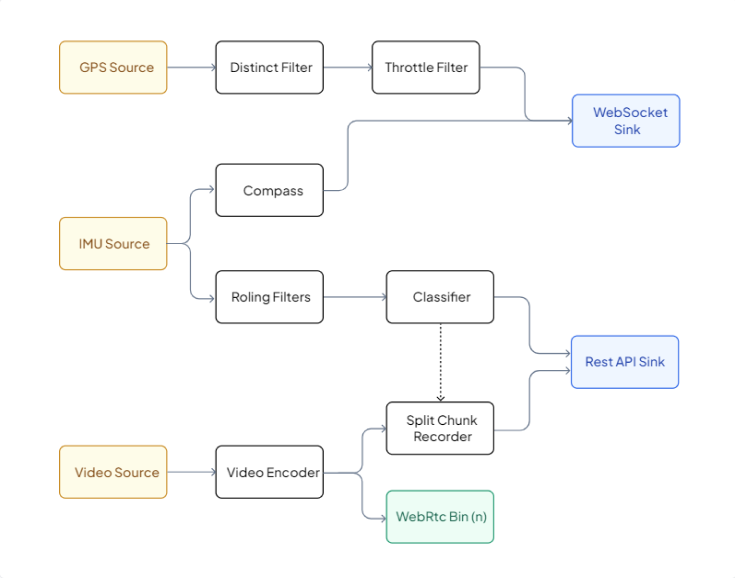
- IMU Sensors data is then passed to Rolling Filter. This rolling filter takes n values before emitting a new event with those n values. And, when it received the (n+1)th value, it emits 2nd to (n+1) values, discarding the first value.
- These n values are passed to Classifier which classifies the events within this window of values. NOTE: the real implementation of Rolling filter is a bit different to avoid duplicate classification of the same event.
- When the classifier detects an event it signals the Split Chunk Recorder.
- We take raw frames Video Source and pass them to Video Encoder.
- Now this encoded video is live-streamed on demand to via WebRTC Bin. A WebRTC bin is constructed and added to the pipeline for each new connection.
- The encoded video is also passed to Split Chunk Recorder that saves the video in chunks of 10s. This also writes in a loop so when there are 10 different chunks, it overwrites the first one.
This is the whole architecture of our RashCam device but, I would like to mention one more piece of the puzzle: when the Classifier signals the Split Chunk Recorder, we need the 30-second video to be uploaded to the server. We achieve this by following the algorithm:
- Copy the previous 10 seconds chunk, wait for the current and a future chunk to be completed, and copy them too.
- If there isn't another event for the next 3 chunks (30s), merge the 3 copied chunks into one video and upload it to the server.
- Else repeat step one until there is no event for the next 30s.
"It seems very simple in words but believe me that was one of the hardest things we solved in this whole project."
Web Application
The purpose of the application is to provide a dashboard for the user to view the live stream from the device, view the detected incidents, and view the recorded videos. The web application also provides a way to configure the device and view the device status.
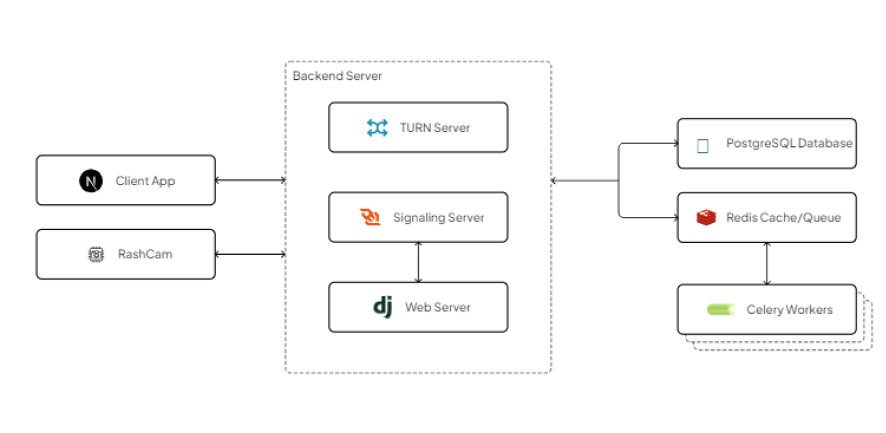
RashCam device uses TURN server for WebRTC communication, websocket for signaling, and RestAPI for posting data like detected incidents/video chunks to the server.
The backend server is responsible for providing the REST APIs for the web app and the device. It also provides the signaling server and the TURN server for the WebRTC connections.
The backend server is responsible for providing the REST APIs for the web app and the device. It also provides the signaling server and the TURN server for the WebRTC connections.
The backend was built using a number of technologies:
- At the core of everything, we have Django Web Server. It uses the Django REST framework to provide REST APIs and Django Channels for WebSocket connections.
- A TURN server, which is just the coturn instance deployed.
- PostgreSQL database to store user authentication information, device info, and detected trips and incidents.
- Redis is used as a cache provider for the backend server, and it also provides a messaging queue between Django and Celery workers.
- Celery workers are being used to offload background tasks from the web server.
On the frontend side, we have NextJS that serves the web app. Our web app is quite simple with 3 to 4 routes other than the authentication pages. Web app communicates with backend via REST APIs.
Conclusion
The nature of this project was very different from the kind of projects we were comfortable developing but, again, this was one of the reasons we chose this project. We wanted to learn new things and we did. We faced a lot of issues during the development of this project. Some of them were easy to solve and some of them were really hard. But, we managed to solve them all.
We learned a lot of new things during the development of this project:
- About the GPS, IMU sensors, WebRTC, WebSockets, Django Channels, Celery, Docker, CI/CD etc.
- To work in a team and how to manage a project.
- To divide a project into small tasks and how to assign those tasks to team members.
- To communicate with each other and how to help each other.
- To manage our time and how to meet deadlines.
- To work under pressure and how to solve problems.
- To debug and how to find solutions to problems.
- To write clean code.
- To write documentation and how to present our work.